 www.thebiscomputing.com
 IBDP Computer Science – 2027
 PTM Appointment



The following program displays Hello, World! on the screen.
public class Main
{
    public static void main(String[] args)
    {
        System.out.println("Hello, World!");
    }
}
In the above code, the System.out.println() statement prints the text Hello, World! to the screen.
Remember these important things about print:
()."".System.out.println() statement ends with a semicolon ;.Not following the above rules will result in errors and your code will not run successfully.
// Your First Program

class HelloWorld {
    public static void main(String[] args) {
        System.out.println("Hello, World!");
    }
}
int age = 24;
int AGE = 25;
System.out.println(age); // prints 24
System.out.println(AGE); // prints 25
int age; // valid name and good practice
int _age; // valid but bad practice
int $age; // valid but bad practice
int 1age; // invalid variables
int my age; // invalid variables
class Main
{
public static void main(String[] args)
{
boolean flag = true;
System.out.println(flag); // prints true

byte range;
range = 124;
System.out.println(range); // prints 124

int age = 42;
System.out.println(age); // print 42

double pi = 3.14;
System.out.println(pi); // prints 3.14

char initial = 'J';
System.out.println(initial); // prints J

String name = "Jeevesh Kumar";
System.out.println(name); // prints Jeeevsh Kumar
}
}
public class divMod
{
public static void main(String args[])
{
int a = 13;
int b=2;
b =a/b;
System.out.println("Quotient: "+b); // Quotient 6
b = a%b;
System.out.println("Remainder: "+b); // Remainder 1
}
}
class Main
{
public static void main(String[] args)
{
int number = 0; // checks if number is greater than 0
if (number > 0)
{
System.out.println("The number is positive.");
} // checks if number is less than 0
else if (number < 0)
{
System.out.println("The number is negative.");
} // if both condition is false
else
{
System.out.println("The number is 0.");
}
}
}
Question 1: Write a program in Java for, assigning grades (A, B, C) based on the percentage obtained by a student.
if the percentage is above 90, assign grade A
if the percentage is above 75, assign grade B
if the percentage is above 65, assign grade C
public class Main {
  public static void main(String[] args) {
    int day = 4;
    switch (day) {
      case 1:
        System.out.println("Monday");
        break;
      case 2:
        System.out.println("Tuesday");
        break;
      case 3:
        System.out.println("Wednesday");
        break;
      case 4:
        System.out.println("Thursday");
        break;
      case 5:
        System.out.println("Friday");
        break;
      case 6:
        System.out.println("Saturday");
        break;
      case 7:
        System.out.println("Sunday");
        break;
    }
  }
}
import java.io.*;
public class Main
{
    public static void main(String[] args)throws IOException
    {
        BufferedReader br = new BufferedReader(new InputStreamReader(System.in));
        System.out.println("Enter the day ");
        int day = Integer.parseInt(br.readLine());
        switch (day)
        {
            case 1:
                System.out.println("Monday");
                break;
            case 2:
                System.out.println("Tuesday");
                break;
            case 3:
                System.out.println("Wednesday");
                break;
            case 4:
                System.out.println("Thursday");
                break;
            case 5:
                System.out.println("Friday");
                break;
            case 6:
                System.out.println("Saturday");
                break;
            case 7:
                System.out.println("Sunday");
                break;
        }
    }
}
1. Sum of all Array elements
import java.io.*;

public class SumArrayElements {
    public static void main(String[] args) throws IOException {
        BufferedReader br = new BufferedReader(new InputStreamReader(System.in));

        // Prompt for the size of the array
        System.out.print("Enter the number of elements in the array: ");
        int size = Integer.parseInt(br.readLine());

        // Declare an array to hold the specified number of integers
        int[] numbers = new int[size];

        // Get user input to populate the array
        System.out.println("Enter the elements of the array:");
        for (int i = 0; i < size; i++) {
            System.out.print("Element " + (i + 1) + ": ");
            numbers[i] = Integer.parseInt(br.readLine());
        }

        // Calculate the sum of all elements in the array
        int sum = 0;
        for (int number : numbers) {
            sum = sum + number;
        }

        // Display the sum
        System.out.println("nSum of all elements: " + sum);
    }
}
2. Find the Largest element in the Array
import java.io.*;

public class LargestArrayElement {
    public static void main(String[] args) throws IOException {
        BufferedReader br = new BufferedReader(new InputStreamReader(System.in));

        // Prompt for the size of the array
        System.out.print("Enter the number of elements in the array: ");
        int size = Integer.parseInt(br.readLine());

        // Declare an array to hold the specified number of integers
        int[] numbers = new int[size];

        // Get user input to populate the array
        System.out.println("Enter the elements of the array:");
        for (int i = 0; i < size; i++) {
            System.out.print("Element " + (i + 1) + ": ");
            numbers[i] = Integer.parseInt(br.readLine());
        }

        // Find the largest element in the array
        int max = numbers[0];
        for (int number : numbers) {
            if (number > max) {
                max = number;
            }
        }

        // Display the largest element
        System.out.println("Largest element in the array: " + max);
    }
}
3. Count Even and Odd Numbers in an Array
import java.io.*;

public class CountEvenOdd {
    public static void main(String[] args) throws IOException {
        BufferedReader br = new BufferedReader(new InputStreamReader(System.in));

        // Prompt for the size of the array
        System.out.print("Enter the number of elements in the array: ");
        int size = Integer.parseInt(br.readLine());

        // Declare an array to hold the specified number of integers
        int[] numbers = new int[size];

        // Get user input to populate the array
        System.out.println("Enter the elements of the array:");
        for (int i = 0; i < size; i++) {
            System.out.print("Element " + (i + 1) + ": ");
            numbers[i] = Integer.parseInt(br.readLine());
        }

        // Count even and odd numbers
        int evenCount = 0, oddCount = 0;
        for (int number : numbers) {
            if (number % 2 == 0) {
                evenCount++;
            } else {
                oddCount++;
            }
        }

        // Display the counts
        System.out.println("Number of even elements: " + evenCount);
        System.out.println("Number of odd elements: " + oddCount);
    }
}
4. Merge two Arrays
import java.io.*;

public class MergeArrays {
    public static void main(String[] args) throws IOException {
        BufferedReader br = new BufferedReader(new InputStreamReader(System.in));

        // Prompt for the sizes of the two arrays
        System.out.print("Enter the number of elements in the first array (a): ");
        int sizeA = Integer.parseInt(br.readLine());

        System.out.print("Enter the number of elements in the second array (b): ");
        int sizeB = Integer.parseInt(br.readLine());

        // Declare the two arrays a and b
        int[] a = new int[sizeA];
        int[] b = new int[sizeB];

        // Populate the first array (a)
        System.out.println("Enter the elements of the first array (a):");
        for (int i = 0; i < sizeA; i++) {
            System.out.print("Element " + (i + 1) + ": ");
            a[i] = Integer.parseInt(br.readLine());
        }

        // Populate the second array (b)
        System.out.println("Enter the elements of the second array (b):");
        for (int i = 0; i < sizeB; i++) {
            System.out.print("Element " + (i + 1) + ": ");
            b[i] = Integer.parseInt(br.readLine());
        }

        // Declare array c to hold the merged elements of arrays a and b
        int[] c = new int[sizeA + sizeB];

        // Copy elements from array a to array c
        for (int i = 0; i < sizeA; i++) {
            c[i] = a[i];
        }

        // Copy elements from array b to array c
        for (int i = 0; i < sizeB; i++) {
            c[sizeA + i] = b[i];
        }

        // Display the merged array c
        System.out.println("nMerged Array (c):");
        for (int i = 0; i < c.length; i++) {
            System.out.print(c[i] + " ");
        }
    }
}
5. Find the common elements between 2 arrays
import java.io.*;

public class ArrayIntersection {
    public static void main(String[] args) throws IOException {
        BufferedReader br = new BufferedReader(new InputStreamReader(System.in));

        // Get the size of the first array
        System.out.print("Enter the number of elements in the first array (a): ");
        int sizeA = Integer.parseInt(br.readLine());

        // Get the size of the second array
        System.out.print("Enter the number of elements in the second array (b): ");
        int sizeB = Integer.parseInt(br.readLine());

        // Declare and populate the first array a
        int[] a = new int[sizeA];
        System.out.println("Enter the elements of the first array (a):");
        for (int i = 0; i < sizeA; i++) {
            System.out.print("Element " + (i + 1) + ": ");
            a[i] = Integer.parseInt(br.readLine());
        }

        // Declare and populate the second array b
        int[] b = new int[sizeB];
        System.out.println("Enter the elements of the second array (b):");
        for (int i = 0; i < sizeB; i++) {
            System.out.print("Element " + (i + 1) + ": ");
            b[i] = Integer.parseInt(br.readLine());
        }

        // Array to store intersection elements
        int[] c = new int[Math.min(sizeA, sizeB)];
        int k = 0; // Counter for elements in array c

        // Find intersection
        for (int i = 0; i < sizeA; i++) {
            for (int j = 0; j < sizeB; j++) {
                if (a[i] == b[j]) {
                    // Check if element is already in c to avoid duplicates
                    boolean alreadyInC = false;
                    for (int x = 0; x < k; x++) {
                        if (c[x] == a[i]) {
                            alreadyInC = true;
                            break;
                        }
                    }
                    if (!alreadyInC) {
                        c[k++] = a[i];
                    }
                }
            }
        }

        // Display the intersection array c
        System.out.println("nIntersection of arrays (c):");
        for (int i = 0; i < k; i++) {
            System.out.print(c[i] + " ");
        }
    }
}
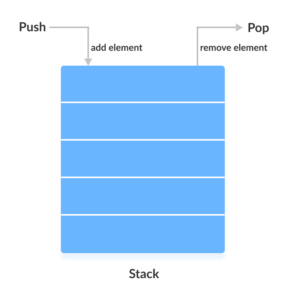
In stack, elements are stored and accessed in Last In First Out manner. That is, elements are added to the top of the stack and removed from the top of the stack.
import java.io.BufferedReader;
import java.io.IOException;
import java.io.InputStreamReader;
import java.util.Stack;

public class Main {
    public static void main(String[] args) throws IOException {
        BufferedReader br = new BufferedReader(new InputStreamReader(System.in));
        Stack<Integer> stack = new Stack<>();

        while (true) {
            System.out.println("nStack Operations Menu:");
            System.out.println("1. Push");
            System.out.println("2. Pop");
            System.out.println("3. Search");
            System.out.println("4. Print");
            System.out.println("5. Exit");
            System.out.print("Enter your choice: ");

            int choice = Integer.parseInt(br.readLine());

            switch (choice) {
                case 1:
                    System.out.print("Enter element to push: ");
                    int element = Integer.parseInt(br.readLine());
                    stack.push(element);
                    System.out.println("Element " + element + " pushed onto the stack.");
                    break;
                case 2:
                    if (!stack.isEmpty()) {
                        int poppedElement = stack.pop();
                        System.out.println("Popped element: " + poppedElement);
                    } else {
                        System.out.println("Stack is empty. Cannot pop element.");
                    }
                    break;
                case 3:
                    System.out.print("Enter element to search: ");
                    int searchElement = Integer.parseInt(br.readLine());
                    if (stack.contains(searchElement)) {
                        System.out.println("Element " + searchElement + " found in the stack.");
                    } else {
                        System.out.println("Element " + searchElement + " not found in the stack.");
                    }
                    break;
                case 4:
                    if (!stack.isEmpty()) {
                        System.out.print("Stack: ");
                        for (int i = 0; i < stack.size(); i++) {
                            System.out.print(stack.get(i) + " ");
                        }
                        System.out.println();
                    } else {
                        System.out.println("Stack is empty.");
                    }
                    break;
                case 5:
                    System.out.println("Exiting program.");
                    System.exit(0);
                default:
                    System.out.println("Invalid choice. Please enter a number between 1 and 5.");
            }
        }
    }
}
import java.util.LinkedList;
import java.util.Queue;

public class Main {
    public static void main(String[] args) {
        Queue<Integer> myQueue = new LinkedList<>();

        // Enqueue
        enqueue(myQueue, 5);
        enqueue(myQueue, 10);
        enqueue(myQueue, 15);

        // Dequeue
        int client = dequeue(myQueue);
        System.out.println("Client served: " + client);

        // Check if queue is empty
        if (isEmpty(myQueue)) {
            System.out.println("The queue is empty.");
        } else {
            System.out.println("The queue is not empty.");
        }
    }

    // Enqueue operation
    public static void enqueue(Queue<Integer> queue, int item) {
        queue.offer(item);
        System.out.println("Added " + item + " to the queue.");
    }

    // Dequeue operation
    public static int dequeue(Queue<Integer> queue) {
        int item = queue.poll();
        return item;
    }

    // Check if queue is empty
    public static boolean isEmpty(Queue<Integer> queue) {
        return queue.isEmpty();
    }
}
Output:
Initial Queue: []

Enqueue(5):
  Queue: [5]

Enqueue(10):
  Queue: [5, 10]

Enqueue(15):
  Queue: [5, 10, 15]

Dequeue():
  Client served: 5
  Queue: [10, 15]

Is Queue Empty? No (False)
Collections store a set of elements. The elements may be of any type (numbers, objects, arrays, Strings, etc.).
A collection provides a mechanism to iterate through all of the elements that it contains. The following code is guaranteed to retrieve each item in the collection exactly once.
// Assume HOT is a collection of temperatures

// Adding items to the collection
HOT.addItem(25)
HOT.addItem(30)
HOT.addItem(35)

// Checking if the collection is empty
if not HOT.isEmpty() then
    // Resetting the iteration
    HOT.resetNext()

    // Iterating through the collection
    while HOT.hasNext() do
        // Getting the next item
        temperature = HOT.getNext()
        // Processing the item
        process(temperature)
    end while
else
    print "The collection is empty."
end if
 Menu
Menu Cover Work